Hey You guys, right now on Social Media Ai Chatpgt photo is trending a lot and many people are following this trend like many people on their post And it is being shared and their page is growing, if you also want to grow your page, you also want to create such an image, you can also do it You can make it without any editing skill. It is very difficult to do such editing but you can edit professional photos with the help of AI. You can make it in 1 to 2 minutes using AI.Which I am going to share with you guys next in this post.
Details:- Top 5 Chat GPT Ai Rain Photo Editing Prompt
Right now you all are observing that it is the rainy season. If you upload any photos season by season, you get very good response on them. Therefore you should upload such type of photos because you know that at this time it is rainy season and many people like to click photos during rainy season or near a river or river. It is shocking but when you click that photo, the photo does not come out good, so with the help of this you can edit very good photos Which I will tell you in the article below and will also give you a prompt and will also tell you how to use it
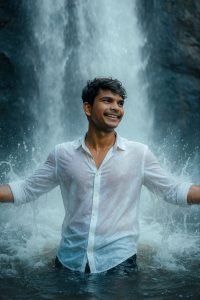
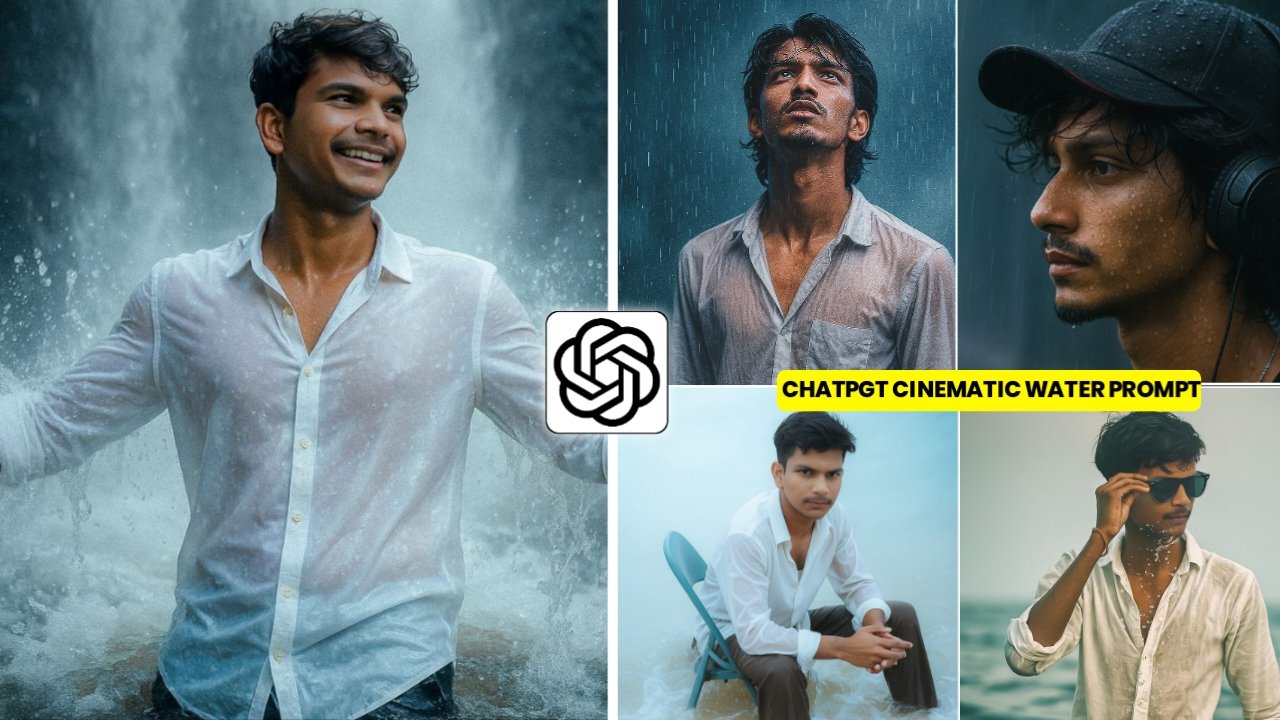
Use uploaded image to convert into a high-resolution, cinematic realistic image of the uploaded person standing waist-deep in water directly beneath a wide, powerful waterfall. The water should pour heavily and spread outward, hitting the head, shoulders, and surrounding area, with dynamic splashes and motion.The person’s arms are spread wide open at shoulder height, palms slightly tilted up, as if embracing the waterfall. He should have a cool, relaxed looking slightly to the side confident and connected to nature.Outfit:A vibrant white stylish shirt with light patterns.The shirt is soaked, slightly unbuttoned at the top of two buttons, clinging naturally with shine and wet folds.The waterfall is wide and thick, with heavy flowing water. The person is partially submerged in water, with visible mist, motion, and splashes. BG: dark textured rocks with cool bluish tone Use soft natural daylight mixed with cinematic contrast. Background is cool-toned (blue/gray) Add slight glow or reflection on wet areas.
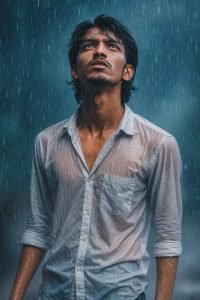
A stylish model standing in heavy rain, soaked and expressive, wearing a semi-wet white dress shirt with subtle transparency, artistically clinging to his form. He looks upward with a cinematic, emotional expression. Rain droplets suspended midair, dramatic lighting with cool blue tones, soft mist in the background, shallow depth of field. Editorial fashion shoot style, aesthetics, captured in ultra-high resolution
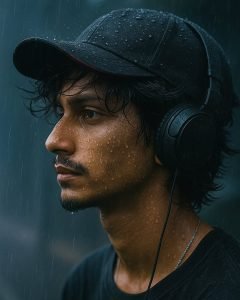
Double tap to copy Profile sees the distance with a depression expression wearing a dark baseball game with red details and a black headset above the ear his dark heavy hair represented by a coastal wind falling in a collier fabric and raindrops moving clearly visible on his skin and the background is very disturbed dark rainy with 64 visible bands of falling rain
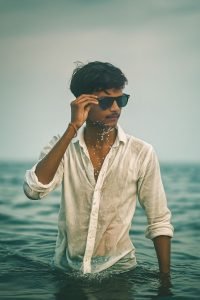
Transform the person in the uploaded photo into a cinematic scene. He is standing waist-deep in calm ocean water, adjusting dark sunglasses with one hand. His wet hair is tousled and slightly stuck to his forehead. He wears a damp, white, casually unbuttoned shirt (top few buttons open), naturally clinging to his torso — styled but not overly revealing. Light seawater splashes rise around his chest and face for a dramatic, dynamic effect. His expression is confident and calm. The background is a soft, overcast sky meeting a tranquil sea at the horizon. The scene is shot at chest level, in wide-angle framing, with shallow depth of field (f/2.8), and stylized with a muted teal-orange cinematic color grade.
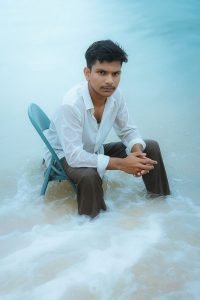
A wet-haired young man with medium-length dark hair based on the uploaded photo sits on a teal foldable chair in shallow ocean water. He is wearing semi-transparent white wet shirt and loose dark brown pants, both soaked and clinging slightly due to the water. The man leans slightly forward with his elbows on his knees and his hands loosely clasped together. He gazes off-camera with a calm, introspective expression. The image is captured from an elevated, slightly top-down wide angle, showcasing the upper body, folded arms, and water ripples around him. Gentle waves and seafoam surround the lower part of the chair and his legs. The overall aesthetic and cinematic with cool, misty color grading—soft blues, desaturated tones and smooth lighting that suggests overcast or early morning conditions.The background blends into a calm ocean with no harsh contrasts, enhancing the tranquil minimalistic vibe. has ultra high resolution, with sharp focus on the subject, soft background blur and editorial photography style.
How To Use Chatgpt Cinematic Rain Ai Photo Editing Prompts
So now I will tell you how to use the prompt. I have given you 5 prompts above and there are images too, so copy the prompt of the image you like and then you have to open the Chat GPT app. And you have to sign up in the app with your Google account, then you have to select your image in which your selfie photo is there, then it will be a good image And paste the prompt you have copied from my website and then send it. Your image will be generated in 1 to 2 minutes. Now you have to save your image.
Is your face looking a bit off in ChatGPT images?
So if your face is not matching in the image you have created through chat gpt, it is looking different, then what you have to do is to swap your face, you will click on the face swap button and you will get The face saw website will open, Now you have to add your image in which the face is visible separately and in the second box you have to add a clear image of your selfie and then click on sawp Now your face will appear in your image, you can load it.
Unlimited Chat Gpt Ai Photo Editing Prompt Tricks
So if you want more prompts then you have to go to my website and click on get prompt then you will get many prompts, whichever image you like you have to copy the prompt of that image