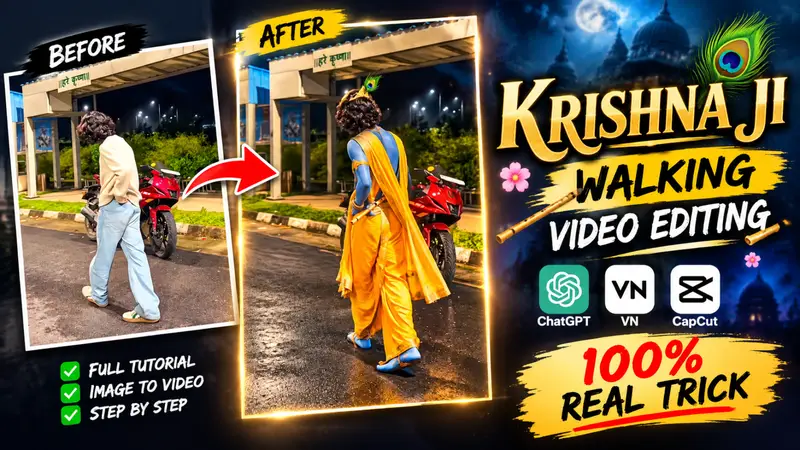
Viral Krishna Ji Ai Video Editing Prompt – So friends, right now you must have seen these types of Krishna Ji walking reel edits going viral very quickly on social media. Everyone is making this type of video. And currently, these types of videos are getting millions of views, and people are also liking these videos a lot. Because in this, there is a boy who walks, and while walking, the look of Krishna Ji appears in him. That is why people are liking these types of videos so much. And if you are thinking of making this type of video, then you must have seen on Instagram that people have given a lot of fake tutorials for this. If you are not able to create such a video, then in today’s article, I am going to give you a 100% tutorial on how to make this type of video. I will explain everything to you. So, just read this article carefully.
Details of Viral Krishna Ai Video Edit
So friends, if we talk about this type of viral Krishna Ji viral edit, then these types of videos are currently creating a huge buzz all over social media. And do you know why these types of videos are going viral? Because you already know that Shri Krishna Janmashtami is coming. So, these types of videos are currently going very viral because the editing of these videos is also very good.And in these videos, the look of Shri Krishna Ji can be seen on any boy. That is why everyone is making these types of videos and uploading them on their social media platforms, which is also making their videos go viral So, you can also make this type of video. Let me tell you how to make it.
Stop Using Fake Templates Real AI Krishna Walking Edit Tutorial
You must have seen in many places on Instagram or YouTube that people are providing templates for this and saying that you can also create this type of viral Krishna video with a VN code or a CapCut template. You must have seen this, but it is completely fake. Your video does not turn out like that at all. Because of this, you are getting very frustrated because you are not able to find the real trick to create such a viral video. So, in today’s article, to create this type of video, first of all, you have to shoot your video. After shooting it, you have to import it into any editing app. After importing it, first, you have to split the video wherever you want. After splitting it, you have to take a screenshot of the video. After taking the screenshot, you have to upload the image to the ChatGPT app. Then, you have to copy the prompt that I have provided on the website, paste it there, and send it. This will generate your image. After saving that image, you have to merge it into the same CapCut app. In the same way, you have to generate three to four images, and by doing this, your reel clip will be created. I will explain the complete process in detail further down in the article. So, stay with the complete article because here you are going to get the 100% real trick to create this type of video.
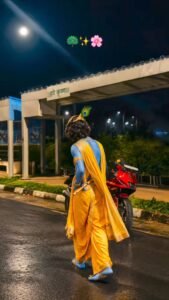

No blue skin, no blue body, no face replacement, no background change, no pose change, no body transformation.
How To Make Krishna Ai Photo
So, to create photos for this type of viral Krishna Ji AI video, first of all, I will tell you a few steps that you need to follow carefully so that you can create such viral Krishna Ji photos very easily.
- First of all, you have to copy the prompt I have given you.
- After that you have to click on the Create Image button below. After clicking, you have to click on the plus second and select your image which you took a screenshot from the video.
- Now after selecting the image, you have to paste it here as prompted by me and send it.
- Now you will see that your image will be generated in a few seconds. Simply click on the image and download it by clicking on download.
- In this way, you have to take three-four screenshots and make them so that your video can be made well.
- If your image is not perfect in one go, then you can generate it again using this prompt so that your image becomes good and if you want to change anything, you can do it.
How To Make Viral Krishna Ji Video With Capcut & VN App
So, to create this type of viral Krishna Ji walking video, you can use any editing app, such as the VN app, InShot app, or CapCut app.It is completely your choice which editing app you want to use. You can use any editing app to create this type of video. And to create it, I will tell you some simple steps here. You should follow these steps as well so that you do not face any problems while creating this type of video. And if you face any problem anywhere in the process, I have also uploaded a full editing tutorial for this, which you can click on and watch on YouTube.
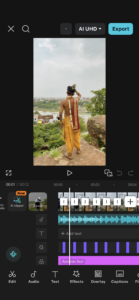
- First of all you have to add your video in Capcut or VN and add audio which is viral and edit it according to the bit.
- Now after adding the beat, you have to split the video in its place.
- After giving the speed, you have to take a screenshot by making the video in full screen and you have to generate the screenshot image in Krishna Ji image with the help of the prompt.
- Then import the generated image next to this clip and continue in the same manner, and your video will be created like this.
- And you can apply some effects to it, it is very difficult to explain the rest in the article, you can apply everything as per your wish.
What Is The Capcut Video Editing App
What exactly is CapCut, and how can you use it for top-notch video editing? CapCut is a versatile video editing application capable of handling everything from basic to professional-level editing that allows you to edit any type of video effectively. It is packed with features such as video splitting, audio integration, special effects, slow-motion capabilities, and speed adjustments; using these tools, you can transform your footage into a professional-quality video. You can also use it to edit Reels, and it currently ranks as the number one mobile video editing app, widely used today due to its excellence. It offers features not found in other editing apps, making CapCut a standout choice. Beyond standard editing, it allows you to use templates simply by inserting your video into a template to create a polished result. It also includes numerous AI-powered features, such as AI image and video generation, among many others; listing them all would make this article far too long.
Conclusion
So friends, in today’s article, I have explained the complete process of editing this type of video, from generating the image to converting it into a video. I have shared the complete real trick with you, with the help of which you can create this type of video. I hope you have understood everything. If you still face any problem anywhere, you can also watch the full editing tutorial on YouTube, as it has also been uploaded there.