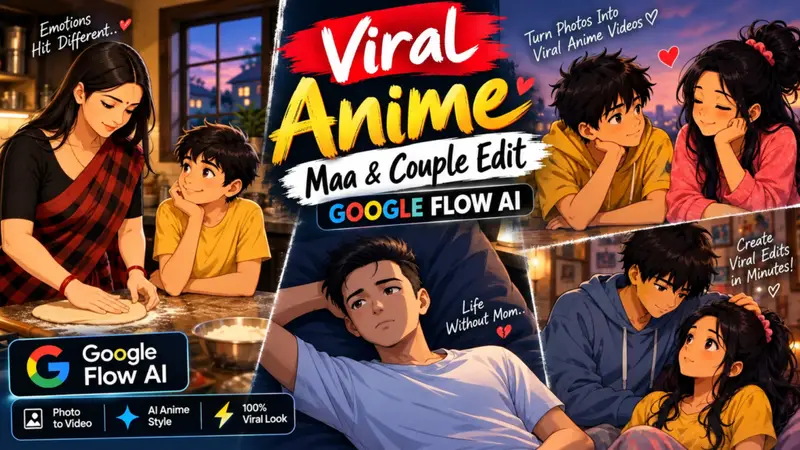
Viral Anime Maa Video Editing Prompt | Viral Anime Couple Prompt – You have likely noticed that new photo or video editing trends emerge on Instagram every single day. Right now, anime-style video edits are going viral featuring themes like mothers, couples, and deities and people really love them because they enjoy watching this kind of anime content. If you want to create these anime-style videos using photos of yourself, your girlfriend, or your mother, you absolutely can. In this article, I will explain the entire process of generating these videos in a very simple way; by following these steps, you can create them for free. I will guide you through the whole process from scratch—making it incredibly easy so you won’t face any issues while creating your own videos.
More Details Of Viral Anime Trend
So friends, if we talk about these viral anime-style trend videos, you’ll see them all over Instagram—garnering millions of views and likes. People are creating them in various ways: some feature couples (like with a girlfriend), others are set to music or comedy themes, and some even feature family members like one’s mother. Essentially, all kinds of these videos are going viral. In today’s video, I’m going to share the prompts you need to generate these videos yourself. You can use your own photos, reference images, or even pictures of your girlfriend to create videos that look just like anime results you’re sure to love. If you create and post these on your social media, they have a great chance of going viral because people really enjoy this style of content. Plus, making them is incredibly easy. So, without further ado, let me walk you through the steps to create these videos.
What You Need to Create These Viral AI Anime Video
First of all, to create such videos, you will need specific websites that facilitate this process. Crucially, you need the right photos for instance, if you want to create a video featuring a couple (like one with your girlfriend), you need photos of both yourself and your girlfriend. Similarly, if you want to make one with your mother, you need photos of her as well as yourself. You can convert these images into an “anime-style” video. You simply upload the photos to the platform and enter a prompt; I have already provided the ready-made prompt here, so you don’t have to do any extra work—just copy and paste it, and your video will be generated.
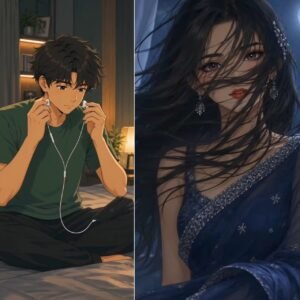
Keep the character’s face, hairstyle, clothing, colors, and overall appearance consistent with the reference image. Do not redesign or change the character.
Scene & flow:
Start with a young anime-style boy sitting casually on a bed in a cozy bedroom at night, looking down at and using his smartphone. Warm bedside-lamp lighting, dark blue night ambience, soft shadows, cinematic atmosphere.
The boy naturally connects wired earphones to his phone and slowly puts the earphones into his ears. His movements should be subtle, smooth and realistic.
Then transition smoothly from the boy’s scene into a close-up portrait of the female character from the uploaded reference image. Make the transition feel emotional and cinematic, as if he is listening to or thinking about her.
Show the female character in a beautiful nighttime indoor setting with soft blue lighting. Her hair moves very slightly with a gentle breeze. She looks naturally toward the camera with a calm, emotional expression and a subtle smile. Add delicate blinking and tiny facial movements.
Camera:
Slow cinematic push-in, gentle camera movement, shallow depth of field, soft focus background, smooth transition between scenes, no sudden camera movements.
Visual style:
High-quality anime illustration, cinematic anime aesthetic, detailed eyes and hair, soft lighting, realistic shadows, beautiful night atmosphere, subtle glow, polished character animation, emotional mood.
Animation:
Natural blinking, slight head movement, subtle breathing, gentle hair movement, realistic hand movement while using the phone and earphones. Keep everything smooth and understated.
Important:
Use the uploaded reference image as the exact visual reference for the character. Preserve facial identity and outfit details throughout the video. No face distortion, no extra fingers, no character morphing, no random outfit changes, no text, no watermark, no subtitles.
Duration: approximately 13 seconds.
Aspect ratio: 9:16 vertical.
Overall feeling: emotional, romantic cinematic anime edit, smooth and aesthetically pleasing.
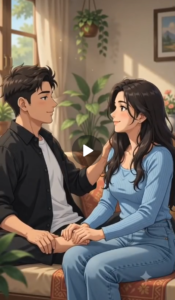
Prompt.
REFERENCE IMAGES:
Use the uploaded photo of the BOY as the exact visual reference for the male character.
Use the uploaded photo of the GIRL as the exact visual reference for the female character.
Transform both real people into a beautiful high-quality 2D anime character style, while preserving their recognizable facial features, hairstyle, hair color, body proportions, age appearance, and clothing from the reference images.
STYLE:
Cinematic 2D anime, premium Japanese animation aesthetic, detailed hand-drawn appearance, expressive eyes, clean line art, beautiful backgrounds, soft cinematic lighting, subtle atmospheric effects, natural anime motion, polished professional animation, highly detailed, emotional and visually engaging.
CHARACTER CONSISTENCY:
The boy must remain exactly the same character throughout the entire video.
The girl must remain exactly the same character throughout the entire video.
Do not change their faces, hairstyles, outfits, body proportions, or identities.
Do not add extra characters.
SCENE:
[ Ladki ladka ke pair daba rahi hai ]
ACTION & EXPRESSION:
Animate natural body movement, realistic anime expressions, eye movement, blinking, hair movement, clothing movement, and appropriate facial reactions according to the scene. Their actions must feel connected and continuous, not random.
CAMERA:
Create cinematic camera movement appropriate for the scene. Use smooth tracking, subtle push-in/pull-out, or gentle camera movement when necessary. Keep the characters clearly visible and maintain strong composition.
ENVIRONMENT:
Create a detailed anime environment that matches the scene. Add natural environmental motion such as wind, moving leaves, atmospheric particles, sunlight, rain, or other effects only when appropriate.
VIDEO:
Exactly 10 seconds.
Vertical 9:16 composition.
One continuous coherent animated sequence.
Smooth motion from beginning to end.
No sudden character changes.
No random objects.
No unnecessary scene changes.
No flickering.
No distorted faces or hands.
No extra limbs or duplicated characters.
No text, subtitles, watermark, or logo.
FINAL LOOK:
Premium viral anime reel aesthetic, emotionally engaging, cinematic composition, beautiful lighting, smooth 2D animation, highly detailed, professional-quality output.
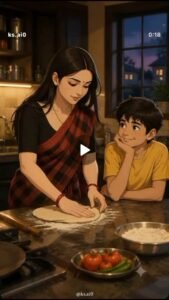
Use the uploaded MOTHER image and uploaded BOY image as STRICT character references.
The mother must retain the exact identity and recognizable facial features of her uploaded reference. The boy must retain the exact identity and recognizable facial features of his uploaded reference. Do not change their age, hairstyle, skin tone, facial structure, body proportions or distinctive features.
STYLE:
High-quality Japanese cinematic anime film style, beautifully hand-drawn anime characters, detailed facial expressions, realistic anime proportions, soft painterly textures, detailed backgrounds, cinematic lighting, subtle depth of field, emotional movie atmosphere. NOT 3D cartoon, NOT Pixar, NOT childish cartoon.
SCENE:
A warm Indian kitchen during evening. The same mother is preparing fresh roti while the same young boy sits nearby watching her lovingly. She rolls the dough with a rolling pin and gently smiles at him. The boy looks at his mother with an innocent, happy expression.
CAMERA:
Begin with a medium-wide shot showing both characters, then slowly push toward them with smooth cinematic camera movement.
LIGHTING:
Warm golden kitchen light with soft evening light coming through the window. Beautiful anime-film lighting, soft shadows and subtle highlights.
ANIMATION:
Natural hand movement, blinking, breathing and subtle facial expressions. Smooth fluid anime animation.
IMPORTANT:
Maintain the exact same mother and boy identity throughout the entire clip. No face morphing, no identity drift, no character redesign, no extra people.
No text, no subtitles, no watermark. Vertical 9:16.
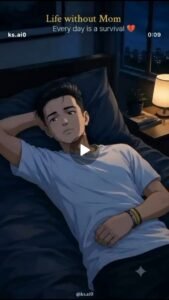
Use the uploaded BOY image as a STRICT character reference. The boy must be exactly the same recognizable boy from the uploaded reference and Clip 1.
STYLE:
High-quality Japanese cinematic anime film style, hand-drawn anime character design, detailed expressive eyes, soft painterly textures, beautiful cinematic backgrounds, realistic anime proportions, dramatic yet natural lighting. NOT 3D cartoon, NOT Pixar, NOT childish cartoon.
SCENE:
Nighttime. The same boy is lying alone on his bed in a quiet bedroom. Cool blue moonlight enters through the window and softly illuminates his face.
He looks emotionally sad and lonely, as if he is missing his mother. His eyes become slightly watery. He slowly looks toward the side and blinks naturally.
CAMERA
Start with a medium shot of the boy lying on the bed. Slowly move closer toward him and finish on an emotional close-up of his face and eyes.
LIGHTING:
Cool blue moonlight, soft shadows, cinematic contrast and emotional anime-film atmosphere.
ANIMATION:
Smooth fluid anime animation, natural breathing, subtle eye movement, realistic blinking and delicate facial expressions.
CRITICAL IDENTITY:
The boy’s face must remain consistent with the uploaded reference. Preserve his recognizable facial structure, hairstyle, skin tone, age and proportions. No face morphing, no identity drift, no redesign or beautification
No mother visible. No extra people. No text, subtitles or watermark. Vertical 9:16.
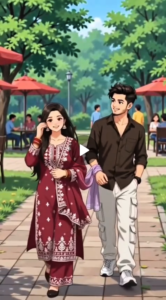
Create a 10-second vertical 9:16 cinematic anime video, closely matching the reference video’s composition, pacing, camera movement, character actions, and visual mood.
STYLE: High-quality cinematic Japanese anime, detailed Indian characters, beautiful expressive faces, smooth 2D animation, soft natural lighting, vibrant colors, clean line art, subtle depth of field, realistic cloth movement, polished Instagram-reel aesthetic, 4K/8K look.
SCENE & ACTION — 0–3 sec: Start with an extreme close-up of the couple’s hands while walking. The young Indian woman wearing a beautiful maroon traditional salwar suit gently holds the young man’s wrist/hand with her lavender dupatta wrapped loosely around his wrist. The dupatta softly moves in the breeze. Slow cinematic camera movement, detailed hands and fabric.
3–4 sec: Camera smoothly pulls back from the hands into a medium shot, revealing the couple walking together.
4–10 sec: Full vertical shot of the same adult Indian couple walking side-by-side through a beautiful green outdoor park. The woman wears a maroon embroidered traditional outfit with a lavender dupatta, long black hair, gentle smile. The man wears a dark brown/black shirt, white pants and white sneakers, short styled black hair, smiling naturally at her. They occasionally look at each other while walking. Background has lush green trees, red outdoor umbrellas, park benches, people sitting in the distance, and a clean paved pathway.
CAMERA: Smooth forward tracking shot, starting close on the hands and gradually revealing the couple, natural handheld cinematic movement, subtle depth of field, no sudden cuts.
ANIMATION: Natural walking cycle, realistic arm movement, gentle hair and dupatta motion, subtle facial expressions, eye contact and smiles. Keep the exact same characters, clothes, hairstyle, facial features and body proportions throughout all 10 seconds.
IMPORTANT: No text, no subtitles, no logos, no watermark, no character morphing, no extra fingers, no distorted hands, no sudden scene changes. Maintain strong character consistency from beginning to end. Vertical 9:16 composition optimized for Instagram Reels.
Another Topics Viral Jaadugar Prompt
AFTER ANIMAL: [ENTER AFTER ANIMAL NAME]
MAGICIAN FACE / AVATAR: [UPLOAD FACE OR AVATAR IMAGE]
MAGICIAN COSTUME REFERENCE: [UPLOAD COSTUME IMAGE]
REFERENCE IMAGE: [UPLOAD STAGE / PERFORMANCE REFERENCE]
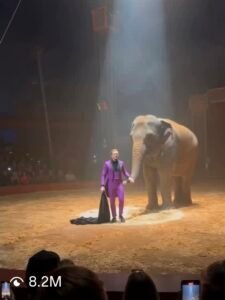
Create a 10-second vertical 9:16 ultra-photorealistic cinematic live magic performance, closely matching the uploaded reference image in stage arrangement, animal positioning, circus atmosphere, lighting and audience perspective. The video should look like a real professional animal magic performance captured live by someone sitting in the audience, not like a CGI animation.
Use the uploaded magician face/avatar image as the exact facial identity reference and the uploaded magician costume image as the exact clothing reference. Preserve the magician’s facial structure, skin tone, eyes, nose, lips, hairstyle and overall likeness throughout the video. Keep the exact costume, colors, hat, cape, shoes and accessories from the costume reference consistent in every frame. The magician is a professional Indian stage illusionist performing a spectacular live animal magic trick.
STAGE & ENVIRONMENT
The performance takes place inside a large dark circus arena with a circular sandy floor and a packed audience surrounding the ring in the darkness. In the exact center of the performance area is a sturdy elevated magic-performance platform, inspired by the uploaded reference image. The platform is approximately waist-to-chest height relative to the magician, with a flat rectangular or slightly elongated stage surface, supported by visible dark metal framework and structural legs underneath. The platform surface is strong enough to safely support the animal and has a realistic worn performance-stage appearance.
The [BEFORE ANIMAL] stands completely on top of this elevated platform, with all four feet/paws/legs firmly positioned on the platform surface. The magician stands on the sandy ground immediately beside the platform, slightly lower than the animal. Keep this height difference clearly visible.
A powerful white theatrical spotlight shines diagonally down from above, illuminating the animal and platform while the rest of the circus remains dark. Visible atmospheric haze catches the spotlight beam. The audience appears as dark silhouettes around the ring, with multiple glowing smartphone screens recording the performance.
Use a single continuous static audience POV camera, eye-level, medium-wide vertical framing. The complete elevated platform, full animal, magician and some audience foreground must remain visible throughout the shot. No camera movement, no zoom, no pan, no tilt and no camera cuts.
0–2.5 SECONDS — ANIMAL ON THE RAISED PLATFORM
A large, completely realistic [BEFORE ANIMAL] stands naturally and confidently on the elevated platform.
The animal must look 100% real and alive, with anatomically correct proportions, realistic skin/fur, eyes, breathing, weight, muscle movement and species-specific behavior. Its feet/paws must make believable contact with the platform surface.
The animal makes subtle natural movements—slight head movement, breathing, ear movement, blinking and small weight shifts—depending on the species.
The magician stands on the ground beside the platform holding a large, heavy, completely opaque black magic cloth. The cloth is significantly larger than the animal and long enough to completely cover the animal from head to feet.
The magician looks toward the animal and audience with a focused, confident stage-performer expression.
2.5–4.5 SECONDS — COMPLETELY COVER THE ANIMAL
The magician dramatically lifts the large black cloth upward and pulls it completely over the [BEFORE ANIMAL] from the top of the raised platform.
The cloth must cover the animal completely from head to feet and from front to back.
By the end of this movement:
NO PART OF THE [BEFORE ANIMAL] IS VISIBLE.
The black cloth must completely conceal:
head and face
ears/horns
neck
entire torso
legs
feet/paws
tail
wings or other species-specific features
The cloth should hang from the elevated platform and reach close to the platform surface, forming a large completely enclosed black silhouette around the hidden animal.
The cloth is thick, heavy, matte black and completely opaque with realistic fabric folds, wrinkles, weight and gravity.
Do not make the cloth transparent. Do not show the animal’s silhouette through the cloth. Do not allow any body part to stick out.
4.5–6.5 SECONDS — MAGICIAN PERFORMS THE TRICK
The [BEFORE ANIMAL] remains completely hidden underneath the black cloth on the elevated platform.
The magician walks slightly around the front/side of the platform and performs several dramatic magician gestures with the wand.
The audience watches in suspense.
The cloth remains completely closed and opaque. Only subtle natural movement of the fabric should suggest that an animal is underneath.
The elevated platform must remain clearly visible beneath the cloth, emphasizing that the animal is standing on a real stage.
The magician then grabs the edge of the black cloth firmly with both hands.
6.5–8 SECONDS — FAST CLOTH REVEAL
The magician suddenly performs one extremely fast, aggressive and powerful sideways pull, ripping the large black cloth completely away from the covered animal.
The cloth flies dramatically through the air with realistic heavy-fabric physics, strong momentum, folds, fluttering edges and believable weight before falling toward the sandy floor beside the platform.
The [AFTER ANIMAL] must NOT appear until the cloth has been completely pulled away.
As the cloth clears the animal, reveal a much smaller, completely realistic [AFTER ANIMAL] standing on the same elevated platform.
The smaller animal was physically hidden underneath the cloth from the beginning.
It must appear naturally and convincingly, with realistic anatomy, fur/skin, eyes, breathing and species-specific movement.
8–9 SECONDS — FINAL REVEAL
The smaller [AFTER ANIMAL] remains standing on the elevated platform while the magician stands beside the platform on the sandy floor.
The magician raises the wand toward the newly revealed animal in a triumphant magical gesture.
The discarded black cloth lies naturally on the sandy floor beside the platform.
The size difference between the original [BEFORE ANIMAL] and the smaller [AFTER ANIMAL] should be visually obvious through the scale of the platform and performance area.
The animal looks toward the audience/camera while the magician maintains a confident, theatrical expression.
9–10 SECONDS — AUDIENCE REACTION
During the final one second, show a powerful spontaneous audience reaction.
Keep the camera in the same audience POV. Several spectators in the foreground suddenly:
stand up or lean forward
point toward the stage
raise their hands
cover their mouths in disbelief
hold smartphones high
react with genuine shock and excitement
Multiple phone screens glow in the dark foreground.
The magician and revealed [AFTER ANIMAL] remain clearly visible on the illuminated elevated platform in the background.
The final frame should have strong depth:
SHOCKED AUDIENCE → MAGICIAN ON GROUND → ELEVATED PLATFORM → REVEALED ANIMAL UNDER SPOTLIGHT → DARK CIRCUS BACKGROUND.
CORE MAGIC EFFECT
REAL [BEFORE ANIMAL] STANDING ON ELEVATED PLATFORM → MAGICIAN COVERS THE ENTIRE ANIMAL WITH A LARGE BLACK CLOTH → ANIMAL IS 100% HIDDEN → MAGICIAN PERFORMS MAGIC → MAGICIAN FASTLY PULLS THE CLOTH AWAY → SMALLER [AFTER ANIMAL] IS REVEALED STANDING ON THE SAME PLATFORM → BLACK CLOTH FALLS TO THE GROUND → AUDIENCE REACTS IN SHOCK.
CRITICAL REALISM RULES
The raised platform is essential. The animal must remain standing on the platform throughout the trick.
The magician must remain on the ground beside the elevated platform, making the stage height clearly visible.
The [BEFORE ANIMAL] must be completely hidden by the black cloth before the reveal. No head, ears, face, legs, feet, tail or other body part can remain visible.
The [AFTER ANIMAL] must remain completely hidden until the black cloth has been fully removed.
Do not morph the animals.
Do not make the animal disappear digitally.
Do not use teleportation, shrinking, growing, smoke, flashes, magical particles or CGI transformation.
Do not make the black cloth transparent.
Do not reveal the smaller animal early.
Do not show both animals simultaneously.
The black cloth must be large, thick, opaque, matte black and physically believable, with realistic fabric weight and movement.
The elevated platform must have realistic structural supports, believable weight-bearing construction and natural shadows beneath it.
The animals must have realistic weight and physically believable contact with the platform.
Keep the magician’s uploaded face and exact costume locked throughout the entire video.
Maintain the same elevated platform, circus ring, spotlight, audience, atmospheric haze, camera position and composition from beginning to end.
Prioritize photorealistic animals, realistic fabric physics, realistic platform construction, believable magician movement, natural animal behavior, cinematic lighting, atmospheric depth, authentic audience reactions and documentary-style live-performance realism.
The final result should look like a real viral Indian circus magic performance, closely resembling the uploaded reference composition, where a large animal standing on a raised stage is completely covered with a black cloth and a different, smaller animal is impossibly revealed when the cloth is pulled away.
To Make Viral Anime Video Using Flow Ai
So, to generate these viral AI videos, let me first walk you through a few simple steps; if you follow them, you will be able to create such videos with great ease. Let me show you how it’s done.
- So first of all, you have to copy the prompt that I gave you and whatever you liked.
- And in the prompt, you also have to keep this thing in mind that the prompt generates a 10 second video at a time, so you will get two-three such clicks through which you will have to generate such a video.
- So after copying the prompt here, we will click on the generate video button.
- Then you have to click on New Project and paste your photos or whatever photo you want to upload in the prompt.
- And select your size 9 * 16 or 16.9, then send it and your video will be generated, save it.
What Is The Google Flow Ai
So, friends, if we talk about what Google Flow AI actually is: it is a video generation website that allows you to convert any image into a video for free. You can simply provide a prompt like a “text-to-video” commandand it will instantly generate the video for you. It offers options to generate videos of varying lengths, such as 5, 8, or up to 10 seconds. You can also select different aspect ratios, like 16:9 or 9:16, along with various other features that make it easy to create viral AI videos. It has many other uses as well; for instance, you can create promotional videos through the site just by entering a simple prompt. Ultimately, it all comes down to the prompt you provide, as the generated video will directly reflect the instructions you give. So, let me show you how you can generate those viral videos featuring themes like mothers, couples, or girlfriends.
What Is a Prompt
You might not be fully aware of what a “prompt” actually is, even though you have likely used them extensively to generate photos and create videos. So, what exactly is a prompt, and how is it created? Let’s say you come across a video you like and want to create something similar or perhaps make a few modifications you would copy the prompt used for that specific video. By using that same prompt, you can generate similar videos or photos essentially creating whatever you envision. A prompt contains all the necessary details and specifications for the image or video you want to produce; it is this detailed input that allows for the generation of a perfect video or photo.
Conclusion
So, I have provided a method specifically a form that allows you to generate these kinds of AI videos. Whether you want to create a video featuring your mother, a romantic couple-style video with your girlfriend, or even a funny couple-themed video, the process and details are covered here, enabling you to produce such videos yourself.