So friends, in today’s article, I am going to show you how to create the viral ‘Shri Radha Ji’ look photo edit that is currently trending rapidly on Instagram. Girls are transforming their ordinary photos into this ‘Radha Ji’ style, which looks incredibly impressive and realistic. If you also want to convert your normal pictures into this ‘Radha Ji’ style, I will provide the specific prompt and a step-by-step guide in this article; by following these steps, you can create such photos with just a single click. So, let’s find out how to create these images—simply read this article carefully from start to finish.
Details Of Viral Radha Rani Getup Photo Edit
Speaking of the details regarding this type of photo editing as you know, Shri Krishna Janmashtami falls on September 4th, and consequently, photos featuring a “Radha” look are going viral rapidly on social media. Girls are transforming their ordinary photos into this Radha-style look, which turns out looking fantastic. This editing style is currently trending and spreading fast across social media platforms; people are posting these images, sharing them as stories, or even using them as profile pictures DP. Given how appealing they look, there is a huge craze for this trend. If you want to create one too, I am going to provide you with prompts for various styles and poses so you can generate these images yourself. So, let me show you how to do it.
What do You Need this Create Image ?
You do not need any professional editing skills or external assistance to create this kind of photo featuring Shri Krishna and Radha. Even if you have no prior experience with photo editing, you can still create such images. All you need is a simple, standard photo of yourself such as one taken with your front or rear camera—where your face is clearly visible and the image quality is good. By using that photo and the prompt I have provided, you can easily create this type of image.
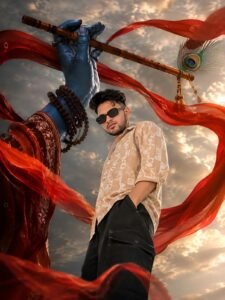
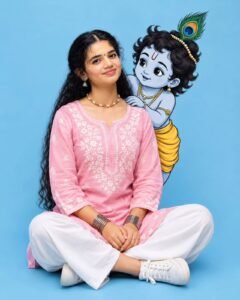

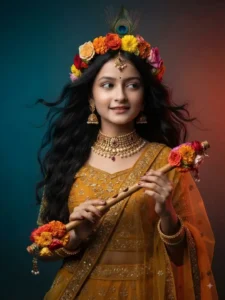
DECORATED
WTH MATCHING FLORAL ARRANGEMENTS AT BOTH ENDS, SyMBOUZING LORp KRISHNA HER POSE 19
SOFT AND GROCEFUL, WITH Y ALIGHT SMILE AND HER GAZE LOOKING SIDEWAyS (OFF-CAMERA).
CREATING A DREAMY AND SERENE EXPRESSION.
ORgMATIC DUAL-TONE STUDIO LGHTNG – COOL BLE LGHT FROM ONE SIDE AND WARM RED/ORANGE
LGHTNG;
LGHT FROM THE OPPOSITE SIDE, CREATING A CINEMATIC COLOR CONTRAST, SOFT FRONT FILL LGHT
HIGHLGHTS HER FACE AND JEWELRY DETAILS WHIE SUBTLE RIM LGHTING ADDS DEPTH TO HER HAIR
AND SILHOIETTE
BACKGROUND
A SMOOTH GRADIENT OTH GRADIENT STUDO BACKDROP TRANSITIONING FROM DEEP TENL/BLUE ON ONE SIDE TO IR WARM M RED/ORANGE ON THE OTHER, ENHANCING THE COLOR CONTRAST AND MOOD.
DETAILs & MOOD:
1479
HGHLy DETAILED SKIN TEXTURE, NATURAL MAKEUP WITH SOFT GLOW, SHARP FOCUS ON FACE AND
JEWVELRY, SHALOW DEPTH OF FIELD, BOKEH SOFTNESS IN BACKCGROUND. ETHEREAL, DNINE ELE JONT, OND
FESTIVE INDIAN AESTHETC EDToRIAL FASHION PHOTOGRAPHy STYLE.
CAMERA & SETNGS
SHOT ON A FULL-FRAME DSLR 85MM PORTRAIT LENS, F/1.8 APERTURE ULTRA HD, BK, RESOLUTON, SHARP
FOCUS, PROFESSIONAL STUDIO PHOTOGRAPHy

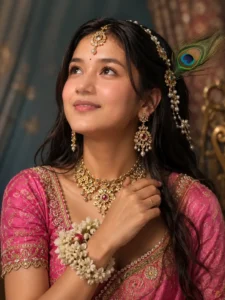
How To Create Viral Radha Rani Look Photo Edit
Here is how you can create those ‘Radha Rani’ look photo edits; let me walk you through the entire process step-by-step—so pay close attention and follow each step carefully.
- First of all, copy the prompt which you like from the above prompt.
- After the prompt is copied, you need to click on the Create Image button below.
- Then you have to upload a simple photo of yours there and paste it by long pressing the prompt.
- And as soon as you press the option button, your image will be generated in a second.
- Now download your final result.
What Is The Chat Gpt App
Friends, if we talk about what ChatGPT is, you likely know it is a bot that instantly helps you complete any question, query, or task you assign to it. For instance, if you want to generate an image, you simply provide a prompt specifying the desired style, and it generates that exact image for you; it can also handle any modifications whether adding or removing elements acting as an all-in-one solution. Beyond that, whether you need information, knowledge, ideas, a bit of motivation when you’re feeling down, or anything else, it serves as a comprehensive resource; you can ask it whatever you like, and it understands your input to offer valuable suggestions. It also features AI tools that allow you to converse with it engaging in the kind of conversation you prefer—along with many other features you can utilize within ChatGPT.
Conclusion
So friends, today in this article I will tell you the complete process system for editing such viral photos. By following this, you can generate such viral Shri Radha Ji look photos. Which looks very good because when you upload your normal photo, it converts it into Radha ji’s gate which people like very much.So I have also given you different types of prompts to make S and have also explained the process in detail, if you follow it then you will be able to make such a photo.