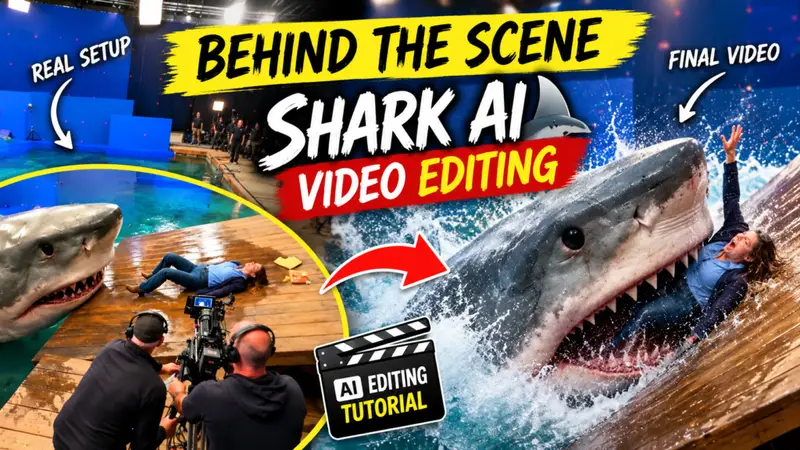
You might have noticed that AI-generated videos featuring a shark specifically ones showing a shark eating a person are currently going viral on Instagram. People really love these videos; they are garnering millions of views, especially those designed with an engaging “hook.” They look incredibly realistic not like AI creations at all which is why people keep watching them. If you create and post similar videos on your social media platforms, your Reels could also rack up millions of views because the content is so compelling. In this article, I’ll show you exactly how to make these videos for free by providing the image prompts and the video prompts needed to generate them. Just read this article carefully to understand the process.
Details Of Viral Bhehind The Seen Shark Ai Video
You are likely aware that “behind-the-scenes” videos often go viral; people really enjoy the content shown in them, partly because the hook is so engaging. If you create videos like this, yours are likely to go viral too. These videos are shot to look like scenes from a movie, and the behind-the-scenes footage reveals how they are actually made. People find this fascinating, and such videos often garner millions of views. In this article, I will explain the easiest way to create these videos for free. I’ll walk you through the entire process so you won’t face any issues generating these viral behind-the-scenes Shorts. You can apply this method to various types of content—whether it’s a movie, web series, cartoon, or anything else since all of them have behind-the-scenes footage that shows how things are actually done in real life. While the final edited version seen in the movie looks polished and impressive, audiences often prefer the behind-the-scenes footage because it shows everything in its raw, authentic form. Let me show you how it’s done.
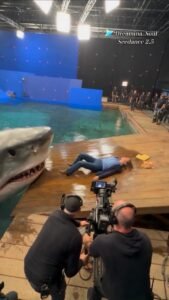
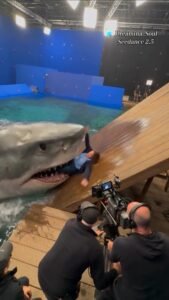
IMPORTANT: This is NOT the final movie scene. It is a behind-the-scenes production photograph showing how an intense shark attack scene is being filmed.
Vertical 9:16 composition, realistic smartphone/social-media BTS photography.
Scene: A huge indoor movie studio with a large shallow turquoise-blue water tank. The walls are covered with bright blue chroma-key/green-screen-style panels and numerous small red motion-tracking markers. Large professional softbox lights, overhead lighting rigs, metal trusses, cables and studio equipment are clearly visible.
In the foreground, two male film crew members wearing black production clothing and professional headphones are operating a large cinema camera mounted on a heavy-duty tripod/dolly. The cinema camera must be clearly visible from behind, including its monitor, lens, cables, camera body and support equipment.
On a wet wooden movie-set platform beside the water tank, a female stunt performer in a casual blue long-sleeve shirt, dark blue jeans and brown boots is lying dramatically on the platform as part of a staged shark attack scene.
A gigantic realistic great white shark is emerging from the water beside her. The shark is a movie creature / animatronic or high-end CGI practical-effect creature, clearly part of a film production. It has realistic wet gray skin, detailed eyes, teeth and water droplets. Its mouth is open dramatically near the stunt performer, but the scene is clearly controlled filmmaking rather than a real attack.
Several additional crew members, production assistants, lighting equipment and safety personnel are visible in the background watching the shot.
The image should communicate: “This terrifying shark movie scene is actually being filmed on a soundstage.”
Natural imperfect handheld framing, slight lens distortion, realistic motion softness, practical studio lighting, wet reflections on wooden boards, believable water splashes, realistic human proportions, documentary BTS photography, high-end film production, photorealistic textures.
Do NOT make it look like a finished movie poster, fantasy artwork, game screenshot, advertisement, or polished cinematic frame.
No text, no watermark, no logo, no subtitles, no extra limbs, no distorted faces, no duplicated crew members, no malformed camera equipment. The final image should look like a genuine viral behind-the-scenes photograph captured during the filming of a massive shark movie.
How To Create Image
So friends, how can you generate such a shark behind the scenes image? I will tell you the entire process of creating it in a very easy way. First of all, you have to know how to create the image.So I will tell you some simple steps below, you just have to follow these steps very carefully so that you can create such an image.
- First of all, you have to copy the prompt I gave you.
- After the prompt is copied, you have to click on the option of the Create Image button below and generate the image through the prompt there.
- Once the image is generated, save it within a few seconds.
CRITICAL CONCEPT:
This is NOT the finished movie.
This is NOT a real shark attack.
This is NOT found footage.
This is a behind-the-scenes production video showing a film crew shooting a staged shark attack scene using a giant movie creature/animatronic shark and visual effects.
The video should feel like an authentic viral BTS reel recorded by someone standing behind the film crew.
SETTING:
A huge professional indoor soundstage containing a shallow turquoise-blue water tank. Large blue chroma-key walls surround the tank. Numerous small red motion-tracking markers are visible on the blue walls. Overhead metal lighting trusses, large rectangular softboxes, cables and studio equipment are clearly visible.
A large wet wooden platform/ramp extends from the water. The wood has realistic wet reflections and water droplets.
FOREGROUND:
Two male camera crew members wearing black production clothes and professional over-ear headphones operate a large professional cinema camera. The cinema camera is mounted on a heavy tripod/dolly support.
The camera operator is actively following the action. The cinema camera monitor, lens, matte box, cables and mechanical support should remain visible.
BACKGROUND:
Several production crew members stand around the set watching the shot. Some hold equipment. Safety personnel and lighting crew are visible. Everything should look like a real controlled movie production.
ACTION — CONTINUOUS SHOT:
0–2 seconds:
Start from behind the film crew. The cinema camera and two camera operators dominate the foreground. Beyond them, a female stunt performer lies on the wet wooden platform beside the water tank. The giant shark is partially visible at the edge of the water.
2–4 seconds:
The stunt performer begins sliding slightly down the wet wooden ramp toward the water as part of the staged stunt. The camera crew immediately tracks her movement. The giant shark slowly rises from the water beside the ramp.
4–6 seconds:
The shark lunges upward in a controlled movie-stunt movement. Its huge mouth opens dramatically near the performer. Water splashes onto the wooden platform. The camera crew remains in the foreground and continues filming.
6–8 seconds:
The shark’s head moves closer to the performer while she reacts dramatically and tries to move backward up the ramp. The camera operator adjusts the cinema camera to follow the action. The giant creature should feel physically massive and heavy.
8–10 seconds:
The shark reaches the performer for the dramatic movie moment, but the framing still clearly shows the camera crew and studio environment. End with the crew continuing to film while the shark remains beside the ramp.
CAMERA STYLE:
Vertical smartphone BTS footage.
Handheld human perspective from behind the camera crew.
Slight natural camera shake.
Occasional tiny framing corrections.
Realistic autofocus behavior.
Natural exposure changes from bright studio lights.
No impossible camera movements.
No drone shot.
No cinematic crane shot.
No perfectly stabilized footage.
VISUAL STYLE:
Photorealistic.
Documentary behind-the-scenes footage.
Real movie-set atmosphere.
Natural imperfect lighting.
Realistic water physics.
Realistic wet wooden surfaces.
Believable reflections.
Detailed shark skin and teeth.
Natural human movement.
Physically plausible interaction between shark, water and ramp.
VERY IMPORTANT:
The shark is a fictional movie creature, created for a film production using practical effects, animatronics and/or CGI. It must never look like a real animal attacking people in an uncontrolled environment.
The blue chroma-key walls, tracking markers, lighting rigs, camera equipment and crew must remain visible throughout the video so the audience immediately understands that this is a movie set.
Do not transform the footage into the finished shark movie.
Do not remove the film crew.
Do not hide the cinema camera.
Do not make the background look like an ocean.
Do not make it look like a news report or real-life attack.
The final result should look like a viral Instagram/TikTok/Reels “Behind The Scenes Of A Shark Movie” clip captured during an actual film shoot.
How To Create Viral Shark Ai Video
So friends, to edit this kind of “behind-the-scenes” AI video, the first step—as I mentioned earlier—is to create the image; I have also provided the prompt you can use to generate it. Once the image is ready, follow the steps I’ve outlined below to convert that image into an AI video. Let’s get started—please follow these steps carefully.
- So friends, to make such a video, first of all you have to copy the prompt given above.
- If you copy the prompt, you will see a Generate Video button below. You need to click on it.
- Now you have to sign up there with your Google account,
- then click on New Project, paste the prompt and uplod image and send it, keep the size as 9 * 16.
- Now you will see that your image will be generated into a video in a few seconds, you have to do that.
- Now you have to download the video that will be generated.
What Is The Flow Ai Video Generate
So, if we talk about what Flow AI actually is: it is a video-generating website that allows you to convert any image into a video or transform text from a script into a video, producing professional-quality results. These videos are highly popular because the tool generates them with audio included; you can create videos lasting around ten seconds at a time, and since it is free, you can produce a large number of them. It offers various features—such as merging two photos into a video or simply entering a text prompt that the AI then converts into a video. There are many other features available that you can utilize to boost your presence on social media platforms. In this article, I have explained the process of editing “behind-the-scenes” style videos using this Flow AI website. I hope you have understood everything.
What Is The Chat Gpt Photo Editing
So, friends, you likely already know what ChatGPT is, and you may have been using it for quite some time. If you haven’t used it yet, let me explain what it is. ChatGPT is an application that allows you to generate images based on a simple text prompt; it creates exactly the kind of image you describe. Additionally, if you need information, ideas, or solutions to specific problems, it acts as an AI-powered bot designed to provide accurate answers to your questions. It performs these tasks exceptionally well. There are many other uses for it as well, but listing them all would make this article far too long.
Conclusion
So friends, in today’s video, I explained the entire process of generating “behind-the-scenes” style AI videos—a method you can follow to create such content yourselves. If you encounter any issues while making these videos, feel free to leave a comment; however, if you carefully follow the steps and processes I’ve outlined, you shouldn’t face any problems at all.