Instagram Trending Smtg Bandage Photo Editing Prompt

Ai Photo Editing

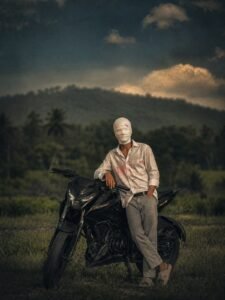
So friends, right now a photo of a face bandage is trending a lot.And this is also called smtg photo. In today’s post, I will tell you how to edit this type of bandage i.e. smtg photo with the help of a secret prompt. And you will also get that secret prompt on this website and I will also tell you the process of using it in Chatgpt or any other AI tool. Just follow the steps given by me and read this article carefully and understand it. And at present, these photos are going viral on Instagram and you can create this type of photo and upload it not only on Instagram but on any social platform. Because it looks very unique and aesthetic and if you make a photo with this type of image and post or reel it, then there will be full chance of it going viral, so let me introduce you to this Below. understand in details

Details Viral Smtg Bandage Photo Edit :-

Smtg Bandage Photo Edit is a photo edit which is done by an injured person, people have made such a trend because a movie named Pathan had come in which Shahrukh Khan had played such a role since then. This trend continues And earlier people used to click such smtg photos with their normal camera, if you manually click such photos and go to edit them then you will have to do a lot of steps plus investment And you need a good camera, you will have to do its color grading later and after processing it a lot, you will be able to make such photos but if you follow the steps given by me And if you use the given prompt, your photo will be made in a completely realistic way and all the color grading will be done in your photo

What is Chatgpt :-

Chatgp is a very famous and helpful application for people which is being used by everyone these days. And today in this post I will tell you how to make such smtg photos using chat only. And you can create any type of photo with Chatgp and ask any question. Chatgp has the answer to every question and Chatgp will help you in every thing with prompt along with photo.
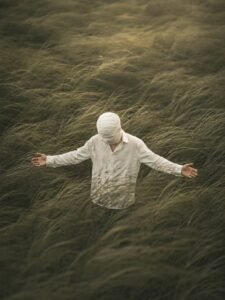
Create a cinematic 9:16 atmospheric editorial portrait using the uploaded photo as the exact identity and outfit reference. Keep the person’s exact face, hairstyle, body proportions, blue button-up shirt, white pants and overall appearance unchanged. Place the subject standing alone in the middle of a vast, dense, wind-swept grass field. Tall olive-green grass completely surrounds the subject and flows strongly in one direction like ocean waves, partially covering the lower body and creating natural motion, depth and solitude. The subject stands in the exact same centered composition with both arms stretched wide to the sides and open palms, matching the reference pose. Cover the ENTIRE HEAD AND FACE with a continuous layered white cloth/gauze wrap — the white wrapping must extend over the face, forehead, hair and entire hairstyle, with absolutely no hair visible. Keep the head shape natural beneath the cloth. Use the same moody muted green/brown color palette, soft diffused natural light, subtle haze, cinematic shadows, shallow depth of field, realistic grass movement, natural fabric texture, high-detail photography, realistic skin on the visible hands, filmic atmosphere, professional editorial photography, ultra-realistic, 8K quality. IMPORTANT: Do not change the outfit. Do not reveal any hair. Do not change the arm pose, hand position, composition, background style or overall mood.

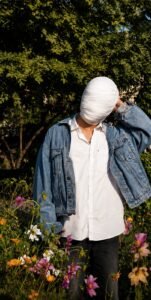
Use the uploaded image as the ONLY and ABSOLUTE reference for the person. Preserve the exact identity, facial structure, face shape, hairstyle, skin tone, body proportions, physique, and EXACT outfit/clothing from the uploaded reference image. Do NOT change, replace, redesign, recolor, or modify the person’s outfit. The outfit must remain exactly as shown in the uploaded image. Recreate the same overall composition and visual style as the target reference scene: a cinematic ultra-realistic outdoor portrait of the person standing in a lush green garden surrounded by dense trees, foliage, and colorful wildflowers. Keep the same general framing, vertical 9:16 composition, camera perspective, subject placement, natural daylight, warm cinematic lighting, realistic shadows, depth, and photographic atmosphere. The person should have the same relaxed standing pose and body positioning as the target scene, with one hand raised naturally near the back/side of the head and the other hand lowered near the flowers. Preserve natural anatomy and realistic hands. IMPORTANT: The BACKGROUND, environment, flowers, trees, lighting, camera angle, composition, color grading, depth of field, and cinematic atmosphere should closely match the target reference scene. ONLY the person and their outfit should come from the uploaded reference image. Create a highly detailed, photorealistic DSLR photograph with sharp natural details, realistic skin texture, realistic fabric texture, natural hair detail, subtle depth of field, authentic sunlight and shadows, high dynamic range without an artificial HDR look, and clean HD/8K-quality detail. Do not add any text, captions, logos, emojis, stickers, graphics, borders, or watermarks. Do not apply a vintage filter, excessive color grading, artificial beauty filter, or cartoon effect. FINAL PRIORITY: 1. Exact person identity from uploaded reference. 2. Exact outfit from uploaded reference. 3. Target scene’s background and environment. 4. Target scene’s pose, composition, lighting and camera perspective. 5. Ultra-realistic natural photographic quality.

Create an ultra-realistic cinematic photograph using the uploaded image as the ONLY and ABSOLUTE reference for the person, motorcycle, outfit, pose and composition. PRESERVE EVERYTHING FROM THE UPLOADED IMAGE EXACTLY: preserve the person’s exact identity, facial structure, hairstyle, body proportions, height, physique, skin tone, pose, posture, hands, arms, legs, clothing, shirt, pants, footwear, accessories and every visible detail of the original outfit. Preserve the exact motorcycle from the uploaded image, including its model, shape, color, body panels, headlights, wheels, tires, mirrors, handlebars, mechanical details, proportions and position. Do not replace, redesign, modify or change the motorcycle in any way. Keep the same person standing with the motorcycle in the same natural pose and maintain the original camera angle, perspective, framing and subject scale. THE ONLY SUBJECT CHANGE: completely cover the person’s entire face and head with thick, clean, opaque off-white cotton medical-style bandage layers, wrapped naturally around the head. Cover the forehead, eyebrows, eyes, nose, cheeks, mouth, jawline, chin and ears. The bandages should have realistic overlapping fabric layers and natural folds. No visible facial features, no exposed skin on the face, and no openings in the bandages. Keep the rest of the person’s appearance completely unchanged. BACKGROUND CHANGE ONLY: replace the original background with a completely different cinematic outdoor environment, such as a dramatic rural landscape with distant mountains, soft cloudy sky, subtle greenery and atmospheric depth. The new background should look naturally photographed and seamlessly integrated with the subject and motorcycle. Maintain realistic natural lighting, realistic shadows, accurate proportions, DSLR photography quality, shallow depth of field, subtle cinematic color grading, detailed fabric texture, realistic motorcycle materials and natural environmental atmosphere. IMPORTANT: Do not change the person’s outfit, motorcycle, pose, body, hands, footwear, accessories, composition or camera perspective. Do not add or remove objects from the person or motorcycle. Do not beautify, reshape or redesign the person. Only add the full head/face bandage and change the background

How to Create Image ?

So, you want to edit a photo like that the one with the bandage? Here are the steps just follow them carefully.
  • First of all, you have to click on the create image button.
  • And you have to login with your Google account.
  • And below you have to click on the plus icon and upload your selfie photo
  • Now you have to copy the prompt I have given above.
  • Then you have to paste the prompt in the text below
  • Now you have to send it.
  • Your image will be ready.
  • Now you have to download it by clicking on your image 
CREATE YOUR IMAGE


Leave a Reply

Your email address will not be published. Required fields are marked *