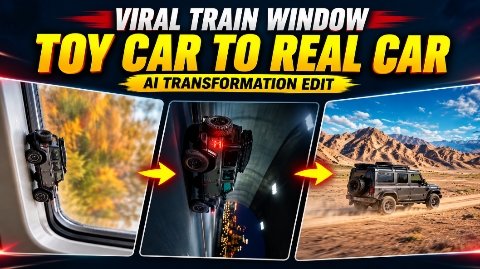
Viral TOY Car to REAL Car AI Transformation Tutorial :- So friends, you’ll see a video editing process going viral on Instagram right now, where a toy car with a train window transforms into a real car and speeds down the road. These videos look incredibly realistic and impressive. These videos are currently garnering millions of views on social media, with people uploading similar videos with their own cars. Video creators are also creating videos with cars that are gaining millions of views. If you’d like to make this type of video for free, in today’s article, I’ll share a complete tutorial on transforming a toy car with a train window into a real car. This process will be completely free. If you’ve seen this on YouTube or elsewhere, you’ll likely hear about numerous paid tools. But you can make it completely free with just one prompt. Let’s explain how to make it below.
Details Of Viral Train Windows Car Reels Edit
AruclWhat you’re seeing on social media right now is a video of a toy car crawling on a train window. After transforming into a real car, it’s driving on the road. Such videos are going viral here. You can make them with any car, any image you have, like a Thar, a Defender, or even a personal car. It’s incredibly easy to make, and completely free. The key to such videos going viral is that people love the car in question. People want this car. That’s why people are liking such videos. As soon as the video starts, there’s a hook: a toy-like crawling video playing on the car window, transforming into something realistic, which is quite engaging. This is why the video is trending so much right now. And it’s also incredibly easy to make. Let me tell you the process of making it.
What Do You Need to Create This AI Transformation Video
To make this viral train window toy car transformation video, you’ll just need an image of your car. If you don’t have one, you can download a printable image from anywhere, or from Google. You’ll find a wide variety of car images there. Examples include the Royale, the Chunor, the Defender, and the G-Wagon. You can make any trending car. If you were to make these now, they would also go viral. Simply use any image and follow the prompts I’ll provide below. I’ll give you two prompts. The first prompt will generate your final video. In this video, you’ll need to take a screenshot at the end frame. Then, upload that screenshot and use the second prompt to transform your transformation into a real-life video. This video is already going viral. So, you can make it this way. Let me explain the details below.
First Video Prompt

Secund Prompt End Frame

How to Create Viral Toy Car to Real Car AI Transformation Video
Now, if you want to create a viral AI video with a car of your choice, follow the steps below. You don’t need any expensive video editing software to create this video.You can try creating such a video with the help of AI tools and a proper prompt.First, copy the initial prompt provided above. Then, click the ‘Create Video’ button. Next, click the plus sign to upload your image, paste the prompt, and set the configuration to ‘Guide it to (or the equivalent setting). Once this is done, your video will be generated; save it. Take a screenshot from the video and crop it. Afterward, return to the website to copy the second prompt. Upload the cropped screenshot back to the ‘Flow AI’ or relevant website, paste the second prompt, and apply the settings. Your video will then be generated. Finally, merge both clips using any video editing app, and your finished video will be ready.
What Is The Google Flow Ai
So friends, Google Play is Google’s artificial brain board, with which you can create text to video, image to video, and even image-to-video. Furthermore, by uploading any reference video, you can create an identical video, all for free. Flow AI also gives you around fifty credits daily, allowing you to easily generate around five videos for free. In this, if you upload your photo and type in a prompt for example, if you want a dance in your photo you type it there, and your photo will dance. You can select the ratio, size, and timing accordingly, and customize it yourself. Simply entering a prompt here allows you to convert it into a video using the prompt. Text-to-Video generates a very realistic, professional video. And this is also completely free. You’ll also find tools you’ll need that allow you to generate videos for free.
Conclusion
So friends, in today’s symbolic time, I have told you the completely free process of editing an AI video of transformation of a toy car into a real car from the window of a viral train, with the help of which you can make an original car-to video from such a viral toy car, which, as you know, is making a lot of noise on social media. And such videos are getting millions of views. The entire process of which I have told you is absolutely free and all the tools are also absolutely free. With which you people can make this video. I hope you all understood and you also make such videos and upload them on your social media platforms. May your reel also go viral. See you with a new article